Step 1 of 6
Customer data, scattered across systems.
It already exists. It is just spread across systems that were never meant to agree, and one customer rarely has the same name twice.
Step 2 of 6
Connect the records. Check the facts.
Contract terms are pulled out with their clause. A readiness check then looks at whether customer IDs match, contract terms read correctly, product names map to one catalog and invoices link to their contracts. Anything that does not pass goes to a person.
| Term | Value | Source |
|---|---|---|
| Uptime | 99.9% each month | §4.1, page 5 |
| Severity 1 response | Within 60 minutes | §4.4, page 7 |
| Cancellation | Not for convenience during the term. For cause after a 30-day cure period | §12.1, page 13 |
| Renewal and price | Notice two months before expiry, increase capped at 3% | §2.2, page 3 |
| Liability | Greater of 12 months of fees or $250,000 | §10.2, page 12 |
- PassCustomer IDs match across systems
- PassContract dates and terms read correctly
- ReviewProduct names mapped to one catalog
- PassInvoices linked to their contracts
Illustrative checks. In a pilot, anything that does not pass goes to a person, and we stop if the data is not ready.
Step 3 of 6
One connected customer view.
Record, contract, support and payments side by side. Cedarwell’s red support cell is why its add-on waits. Select any cell in the product to see the evidence.
Cedarwell Health
A reply is due in 30 minutes. Hold the add-on offer.
Illustrative sample data.
Step 4 of 6
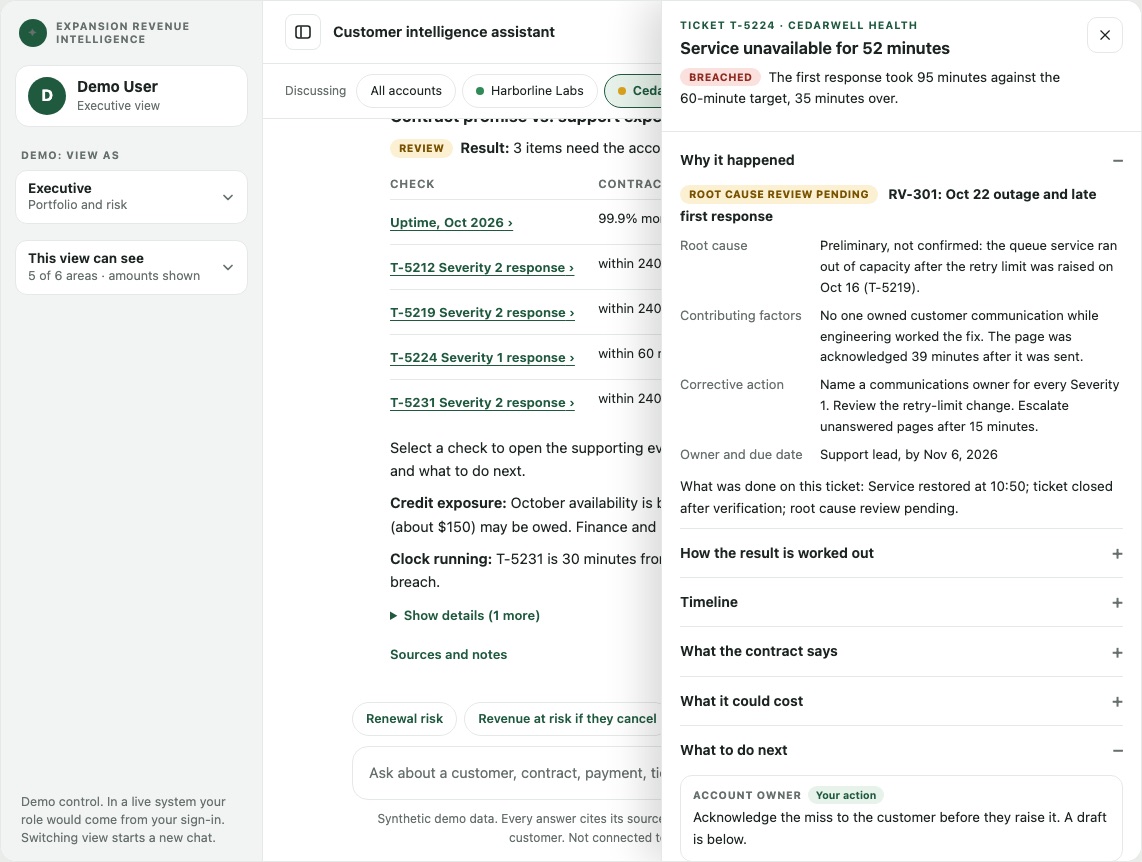
Ask the question. See the evidence. Know what to do next.
Ask a question and get an answer linked to the record it came from. Then open the evidence.
99.9% each month, excluding scheduled maintenance 1. Below that, the customer receives a 5% credit on that month’s fees 2. A Severity 1 incident needs a first reply within 60 minutes 3. Evidence ›
No. Ticket T-5224, a Severity 1 outage, got its first response in 95 minutes against a 60-minute target 4. Evidence ›
Contract intelligence
Every term, with its clause.
Promise vs. reality
Tickets checked against the contract, before a breach.
Next-product ideas
What similar customers bought, held back when something says wait.
Ticket automation
Route, suggest, draft a fix, escalate with context.
Step 5 of 6
One view. Role-specific decisions.
The same Cedarwell record, different views. Dollar amounts are visible only to the roles that should see them. Invited users can open the demo as any role.
What each role sees: one Cedarwell example
Cedarwell Health. A Severity 1 ticket got its first response in 95 minutes against a 60-minute target, and $4,500 is unpaid. Hold the add-on offer until the account is stable.
Wait on Cedarwell Health: an open support breach says to hold the add-on offer. Harborline Labs can proceed: record verified, no critical tickets, invoices current.
Cedarwell Health: $4,500 is unpaid on a partial payment of the September invoice. A $6,000 invoice is scheduled for December.
Missed: Cedarwell’s Severity 1 ticket T-5224 got its first response in 95 minutes against a 60-minute target.
No cancelling for convenience during the term, and a 30-day cure period for cause (§12.1). Renewal notice is two months, with increases capped at 3% (§2.2).
Illustrative role views on synthetic data.
Step 6 of 6
Prove the value before you scale, with measures agreed up front.
We capture a baseline from your own history, agree the targets with you, then measure the pilot against them.
Baseline
From your history and a short timing exercise.
You decide: agree the targets
Pilot
Six to eight weeks on one customer base.
You decide: keep going
Review
A measured result and a subscription decision.
You decide: subscribe or stop
What we need to begin
- Customer listWith owners and industry
- Product ownershipWho owns what, with dates
- ContractsMaster agreements and order forms
- InvoicesBilled, paid and overdue
- Support ticketsSeverity and resolution
- Knowledge baseOptional, for ticket suggestions
Questions
What buyers ask first.
Does it replace our CRM?
No. It sits on top of your existing CRM and billing as a layer. Stage one is read-only. Writing recommendations back into the CRM is an optional later step, and only after human review and approval.
What data do we need to start?
Customer records, contracts or order forms, billing and invoices, and support tickets. We start from file exports in days and move to live connectors later. A data-readiness check comes first, and we stop early if the data is not ready.
Who does the integration?
We do. Connecting the data, building the customer record, and putting the AI on top are one engagement with one accountable team.
How fast can we see results?
Standard connectors and a configuration template keep onboarding to days or weeks. A pilot runs six to eight weeks, with success measures agreed up front. We do not promise results before they are measured on your data.
How is our data handled?
In the final solution: under data-processing terms, with an audit trail. Your data is never used to train AI models. Each role sees only what it needs, and we work within your data classification and access restrictions.
Is our data used to train AI?
No. We never train models on your data. AI is used to understand your records and documents and find the gaps, and every answer is tied to its source.
Will it contact our customers?
No. It drafts for the account owner to edit. Nothing leaves without a person sending it.
How is it priced?
We start with a fixed-fee pilot, credited against your first subscription if you continue. Details on a call.
Is this regulatory KYC?
No. “Know your customer” here means a complete view of the customer for revenue teams. Compliance and anti-money-laundering are out of scope.